

Free Dental Software Download? Desktop vs Cloud Explained
Searching for free dental software to download? See what desktop installs involve, why cracked copies are risky, and when browser-based software fits.
Synora is a modern, cloud-based dental practice management platform engineered by Nano AI for dental practices across Egypt and the Middle East, available in Arabic and English. A Free plan with no time limit, not a trial: appointments, the dental chart, billing and patient files, in one place.
Scattered tools cost clinics hours every day. Synora brings scheduling, clinical charting, billing, lab cases and patient communication into one cloud system

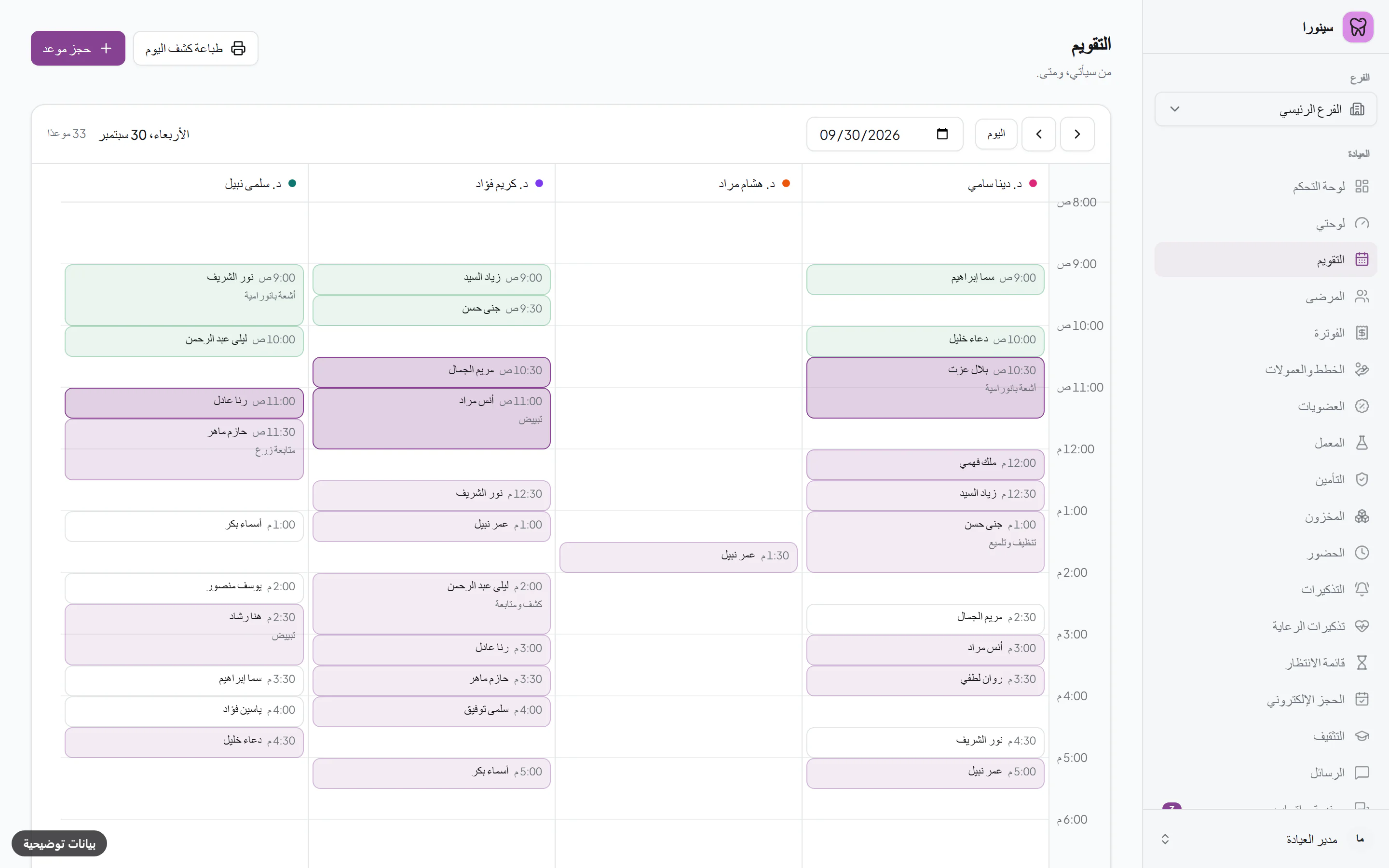
Book Mona Adel on Tuesday at 9:30 for a check-up with Dr. Karim.
Reminder sent on WhatsApp → visit charted on the odontogram → invoice issued from the completed work → paid in cash and from her wallet.
One visit: the booking, the chart, the bill and the reminder live in the same record.
Staff work only in the branches they are assigned to. Cash is closed per branch; the owner's reports cover all branches together, and staff see their branch's.
Encrypted connections, two-factor sign-in, and an append-only audit log of who opened which chart, medical history and images. Built with Egypt's Personal Data Protection Law (151/2020) in mind.
Right-to-left layout, a bilingual procedure catalogue and printouts, and each user works in their own language.
Permanent and primary teeth in FDI notation. Chart per surface, build plans with prices, and track what the patient accepted.
Create a case, follow it from sent to delivered, record try-ins and remakes, and reconcile the lab's monthly statement.
Stock per warehouse, transfers between warehouses, automatic deduction of materials when a procedure is completed, and low-stock alerts.
Installment schedules, deposits in a patient wallet, split payments, and each dentist's commission at their own percentage, on what was invoiced or collected, with the lab bill taken off first if you choose. Plus a daily cash close.
Automatic appointment reminders from your clinic's own WhatsApp Business number, connected through Meta's WhatsApp Cloud API.
Share a treatment plan, an invoice or images through a link you can protect with a PIN and revoke at any time. Nothing for the patient to install.
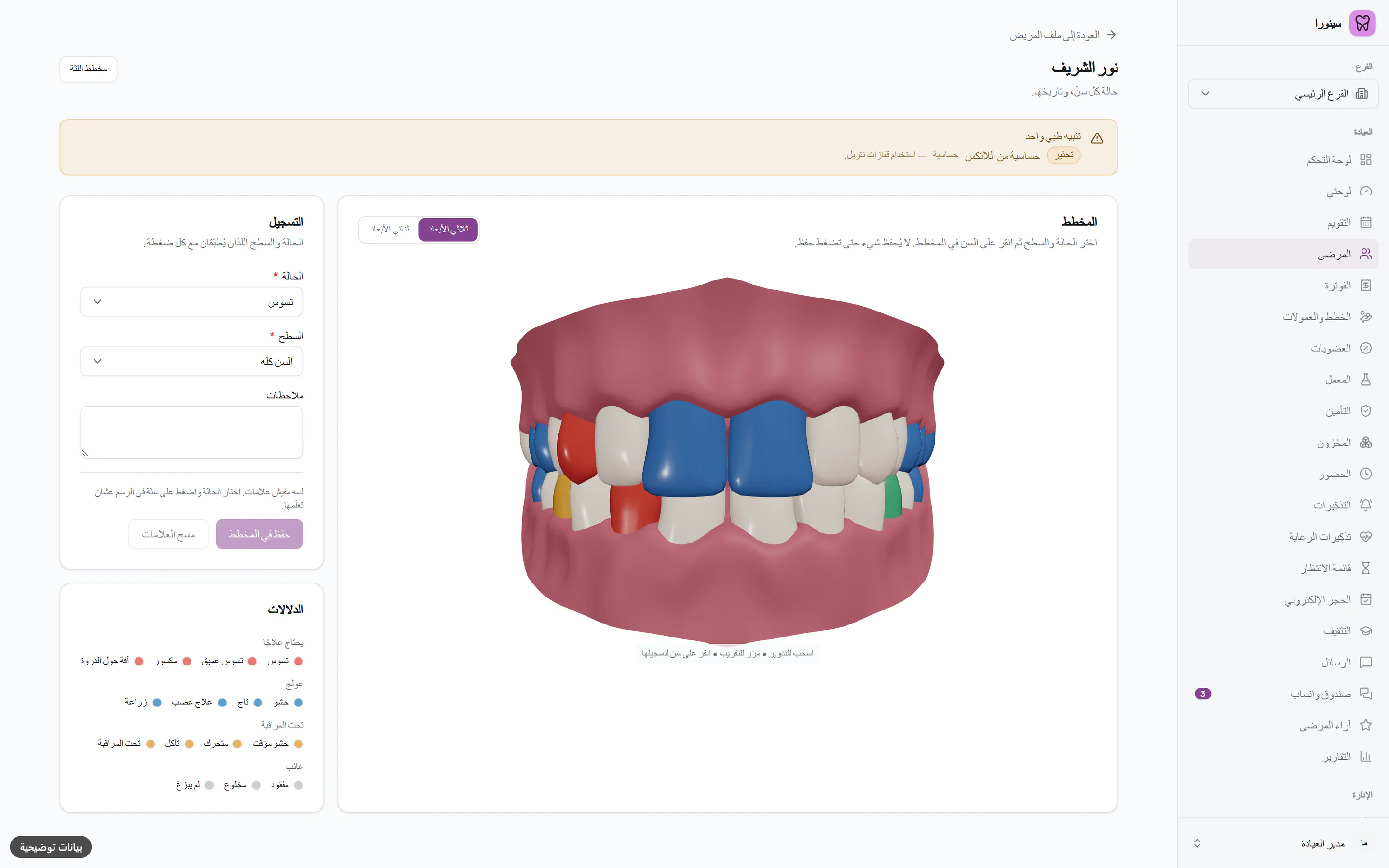
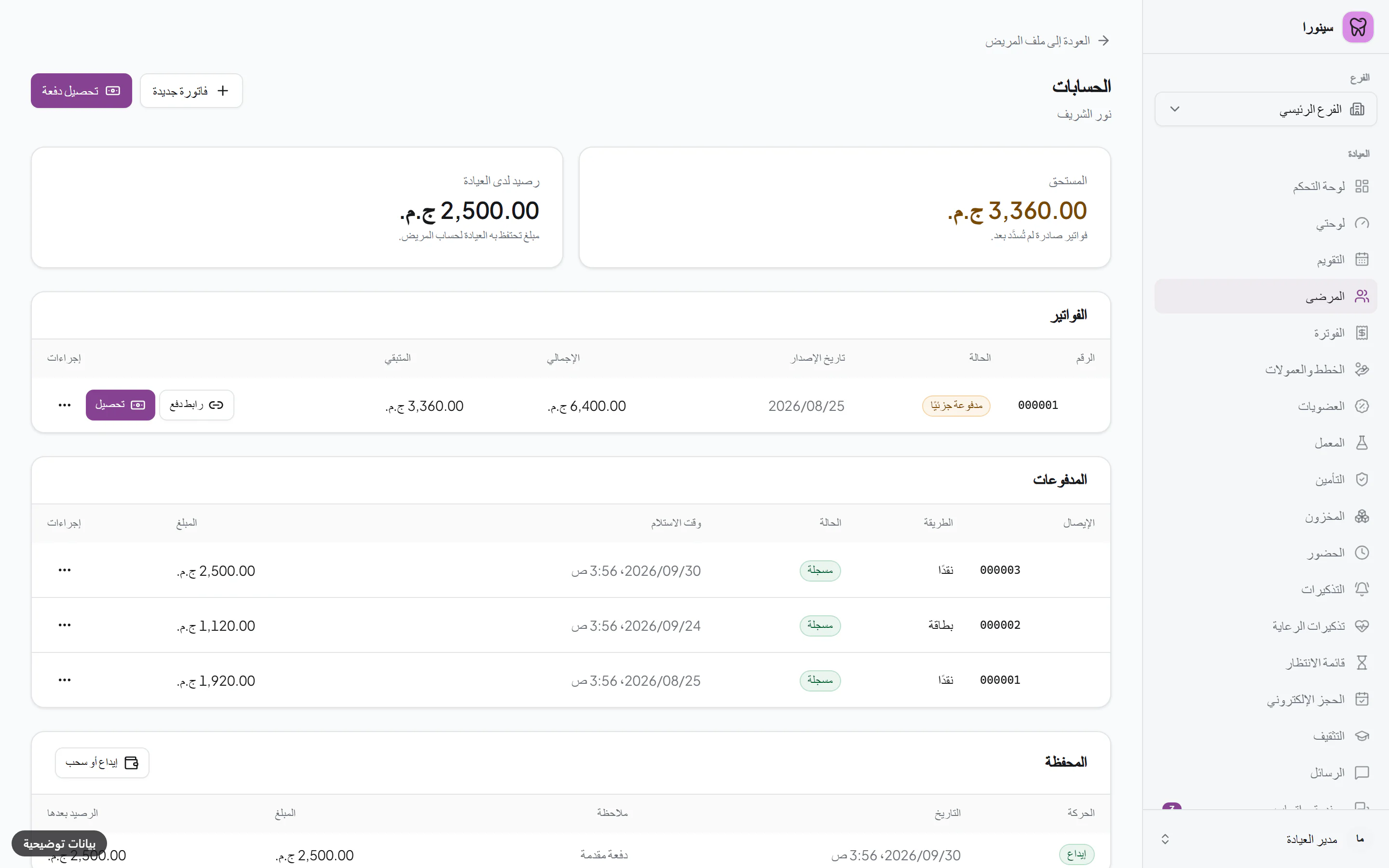
Synora is a modern, cloud-based dental practice management platform engineered by Nano AI for dental practices across Egypt and the Middle East, available in Arabic and English. Free plan, with no time limit: calendar, dental chart, treatment plans, billing and patient records, up to 50 patients. Basic, EGP 799 per clinic per month, adds online booking, WhatsApp reminders on the clinic's own number, lab cases, inventory, insurance claims and dentist commissions; Pro, EGP 1,500, adds WhatsApp from Synora's number and the AI assistant.
A dental clinic's daily work: scheduling and online booking, patient files and medical history, the odontogram, treatment plans, prescriptions, billing with a patient wallet and installments, each dentist's commission at their own percentage, insurance claims, dental lab cases, inventory, staff attendance, WhatsApp and email messaging, and reports.
Yes. Every new clinic gets the Basic plan free for 14 days. If you don't pay by the end of the 14 days, the clinic moves to the Free plan automatically and nothing is charged. No card is needed to sign up.
Yes. The Free plan has no time limit and needs no card: one branch, one treatment room, one staff account (the owner's own) and up to 50 patients, with the calendar, odontogram, treatment plans and billing. When you need more, the same account moves to Pro. Online payment inside the app isn't switched on yet, so for now you upgrade by contacting us.
Yes. A dental clinic anywhere in the Arab world can use Synora for appointments, patient records, billing and the dental chart. Prices are in Egyptian pounds (EGP) and depend on the country of your clinic, chosen at sign-up. Your bank may convert the amount. The clinic's own prices and invoices can be in its own currency, chosen at setup (one currency per clinic). Online payment inside the app isn't switched on yet, so for now you upgrade by contacting us. Synora does not currently connect to Saudi ZATCA e-invoicing or NPHIES, or to other Gulf health-data platforms, and it is not hosted inside the Gulf. A clinic that must have those integrations should not subscribe yet; everything else works.
Basic is EGP 799 a month or EGP 7,990 a year; Pro is EGP 1,500 a month or EGP 15,000 a year. Prices are in Egyptian pounds (EGP) and depend on the country of your clinic, chosen at sign-up. Per clinic — not per chair or per user. Both include every module, with unlimited patients, staff and rooms for one branch. The difference is what costs us money on every message: Basic sends WhatsApp from your clinic's own number, which Meta bills to you directly; Pro adds Synora's number with 1,500 messages a month included, and the AI assistant. Pro can add up to 4 extra branches; groups with more than 5 branches can talk to us about Enterprise.
Yes. On Pro the clinic owner can add up to 4 extra branches (5 in total) from the Plan & billing screen; groups with more than 5 branches can talk to us about Enterprise. Staff log in once and work only in the branches they're assigned to. A patient has one file across branches, and cash is closed per branch. The owner's dashboard and reports cover all branches together, while staff see their branch's.
Yes. Invoices are created from completed procedures. Payments can be split across cash, card, bank transfer, cheque or the patient's wallet. Insurance claims, on Basic and Pro, go through draft, submitted, approved and paid, including partial approvals and rejections.
Yes, on Basic and Pro. Each clinic on Basic or Pro gets a public booking page with live availability. The booking goes straight into the clinic's calendar (a clinic can also ask for a deposit: that needs the clinic's own Paymob account, connected in Synora's Integrations screen, and the slot is held for a set time while the patient pays), and reminders go out on WhatsApp once the clinic connects its own WhatsApp Business number and creates an approved reminder template.
On Basic and Pro, you create a lab case from the Lab screen and pick the patient, then record each stage — sent, in fabrication, try-in, received, delivered — with its cost. At month end, the lab's statement is reconciled against the cases.
Connections are encrypted, sign-in supports two-factor authentication, and every view of a patient's chart, medical history or images is written to an append-only audit log. Synora is built with Egypt's Personal Data Protection Law (151 of 2020) in mind.
A modern browser — Chrome, Edge, Safari or Firefox — on a computer or tablet. There is nothing to install, though you can optionally install it from the browser to the home screen or desktop as an app.
Partly. Synora is a web app and needs an internet connection for almost everything. On Basic and Pro, a device that has opened the calendar before keeps a saved copy of today's and tomorrow's schedule, so reception can open it and mark patients arrived when the internet drops; those check-ins sync when it is back. Booking, patients, invoices and the other screens need the internet. The clinic's data is kept online rather than on one computer, so any computer or tablet with internet access can open it — a phone's mobile hotspot included, if the clinic's line goes down.
Yes, the patient list. Upload an Excel (.xlsx) or CSV file, up to 1,000 patients per file, with a template to download and a preview before importing; a patient whose mobile number is already on file is skipped, and your plan's patient limit applies. Only patients are imported, not appointments, medical history, images or balances. The Free plan holds up to 50 patients; Pro has no patient limit.
Searching for free dental software to download? See what desktop installs involve, why cracked copies are risky, and when browser-based software fits.
How to run dental patient recall: build the overdue list, write the message, respect consent, and see what Synora does on each plan.
How to run in-house payment plans at a dental practice: a written policy, a down payment, a clear schedule and a weekly check on late installments.